Genota 5
Menu
Index

  Categories List

 
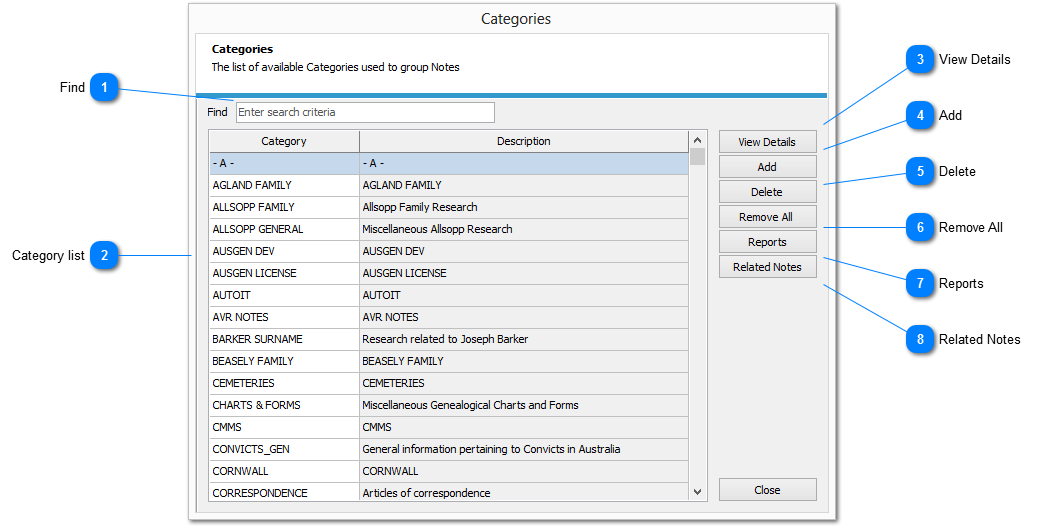
On selecting the Categories option from the View Toolbar the Categories list view, as shown below, is displayed.
 
  Categories List
1

Find

Enter a value in the FIND input box to filter the list of categories by that value
 
All columns are used as search targets, i.e Entering a search criteria  will return all records containing that value wherever it appears in any of the column in the shown in the list
 
To remove a filter delete the value in the FIND Box
 
This search is not case sensitive
 
2

Category list

Displays a list of all categories.
         
          This list is sorted on category by default
 
3

View Details

Displays the CATEGORY DETAIL displaying the details for the selected category in edit mode
 
4

Add

Displays the CATEGORY DETAIL dialog to enable the creation of a new category
 
5

Delete

Removes the selected category from file. This action cannot be reversed.
 
6

Remove All

Purges all records from the category master file. This action cannot be undone
 
7

Reports

Displays the REPORT SELECTOR to enable the generation of category reports
 
8

Related Notes

Displays the list of NOTES attached to the selected category