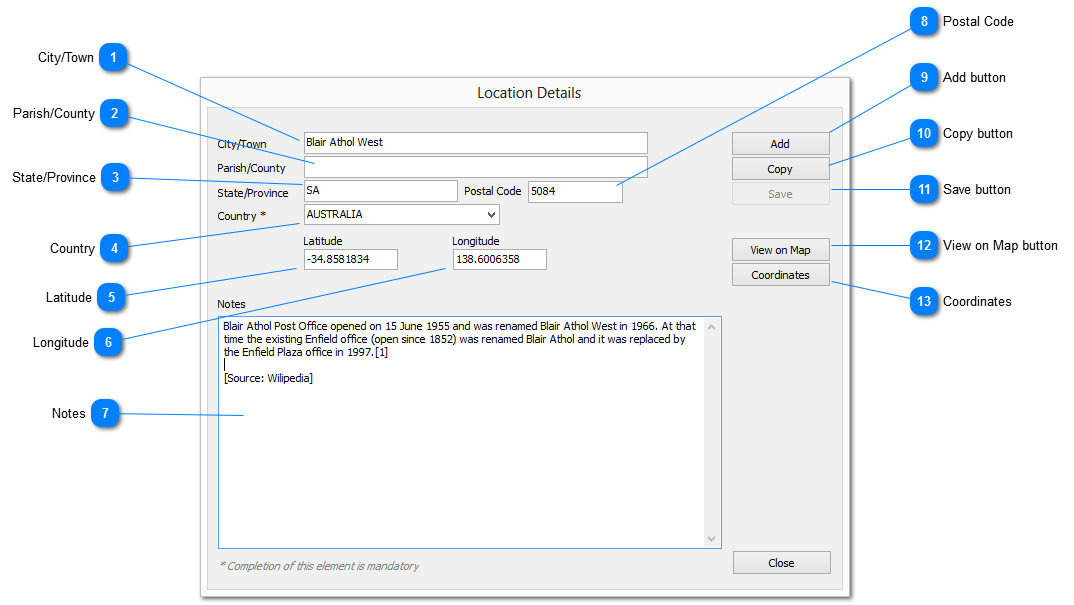
The LOCATION DETAILS dialog provides for the maintenance of Locations within Genota
The minimum requirement for a Location is the name of the Country in which it resides
 City/Town
The name of the city or town that represents the location
|
|
 Parish/County
The parish or county in which the location resides
|
|
 State/Province
The state or province in which the location resides
|
|
 Country
Select the country from the drop down list or enter manually.
This element is mandatory
|
|
 Latitude
Provides the latitude for the location
Refer Coordinates
|
|
 Longitude
Provides the longitude for the location
Refer Coordinates
|
|
 Notes
Provision to record notes related to the location
|
|
 Postal Code
The postal code as used by the country's postal service to identify the location
|
|
 Add button
Clear all elements to enable the creation of a new Location record
|
|
 Copy button
Copy the contents of the current location record as a new location with the City/Town element information removed
|
|
 Save button
Save changes to the location record
|
|
 View on Map button
Display the location on a map
|
|
 Coordinates
This option will retrieve the geolocation coordinates for the location, and populate both the latitude and longitude elements
|
|