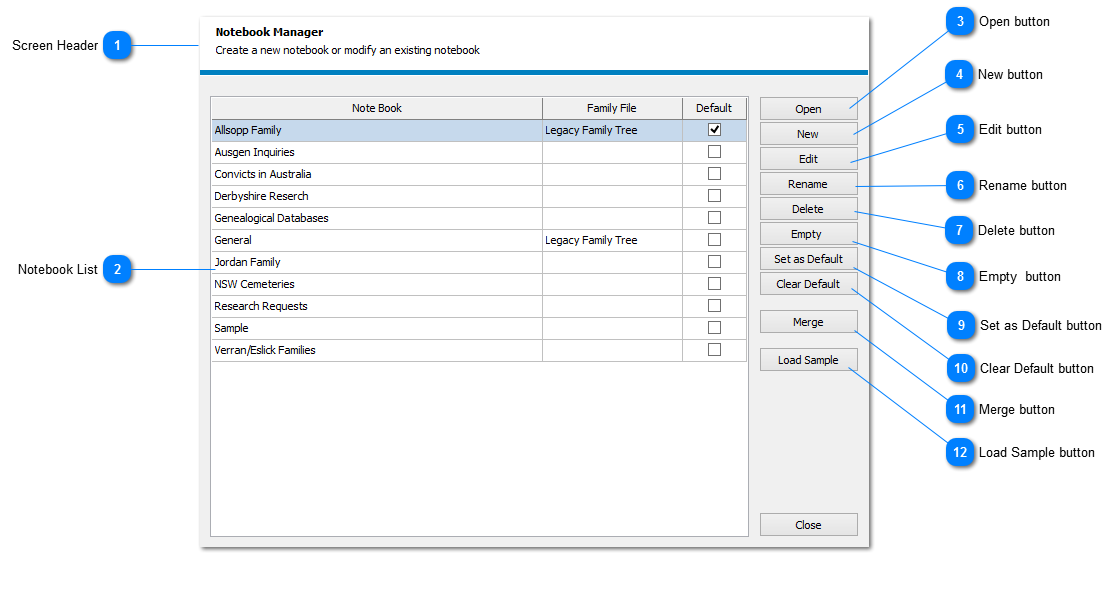
Screen Header
Title and description of the screen
|
|
 Notebook List
The list of notebooks available for use
|
|
 Open button
Open the selected notebook and list all notes stored on the NOTE LIST
|
|
 New button
|
|
 Edit button
|
|
 Rename button
Rename the selected notebook
|
|
 Delete button
Delete the selected notebook and remove all associated notes, etc
This action cannot be reversed
|
|
 Empty button
Remove all associated notes, etc from the selected notebook
The notebook is not removed
This action cannot be reversed
|
|
 Set as Default button
Select to make the selected notebook the default to open when Genota is run
|
|
 Clear Default button
Remove the default status from the currently default notebook
|
|
 Merge button
Merge two (2) notebooks and their contents
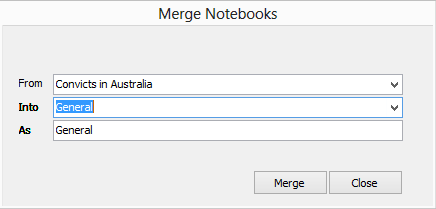
On selecting the MERGE NOTEBOOKS dialog will show as follows
Select from the drop down lists the notebook to be removed [FROM] and the notebook into which the FROM notebook will be merged [INTO]
By default the INTO notebook will be copied to the AS element meaning the new notebook will retain the name of the INTO notebook
If a new name is required for the notebook, manually enter the name in the AS element
Click select the MERGE button to process the request
|
|
 Load Sample button
This option will load the SAMPLE NOTEBOOK which provides a basic introduction on how items are stored in Genota
|
|