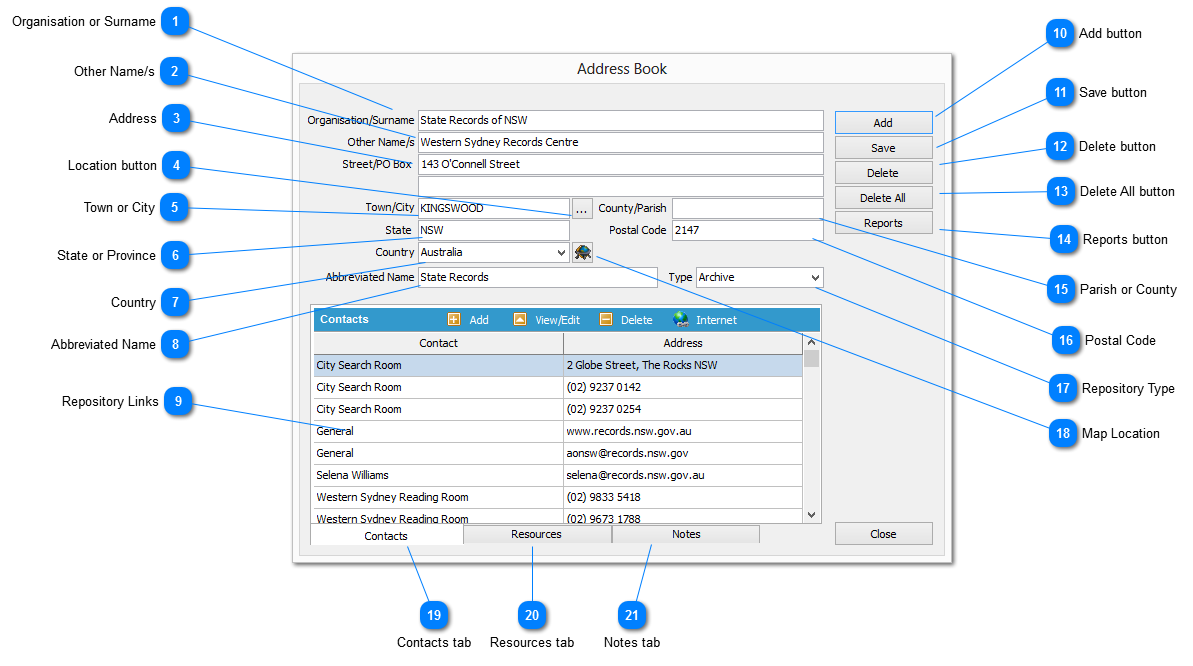
The REPOSITORY DETAIL is used to record all information relative to each Repository held on the Address Book is comprised of four (4) sections, being:
|
Header
|
The Repository name and location
|
|
|
For recording an unlimited points of contact within a Repository
|
|
|
For recording an unlimited number of resources held by a Repository
|
|
|
For recording general information related to the Repository
|
 Organisation or Surname
The name of the repository
It may be the name of an organisation, a surname of a person, or the like
|
|
 Other Name/s
Other names for a person if their surname is used against the Organisation or Surname element
It can also be used for organisational divisions or department at different locations
|
|
 Address
The name of the city or town where the repository is located
|
|
 Location button
Click select to retrieve a location from the LOCATION MASTER view
Selecting a location by this method will populate the TOWN, STATE, POSTAL CODE and COUNTRY data elements
|
|
 Town or City
The name of the city or town that represents the location
|
|
 State or Province
The state or province where the repository is located
|
|
 Country
The country in which the repository is located
Select an value form the drop down list
|
|
 Abbreviated Name
This is an abbreviated form of the repository name which is used in lookup lists and reports
When a repository is created the first 40 characters of the ORGANISATION OR SURNAME element is copied to the Abbreviate Name element by default
|
|
 Repository Links
This section of the view holds links to CONTACTS, RESOURCES and NOTES associated with the repository
|
|
 Add button
Clear all elements to enable the creation of a new Address Book REPOSITORY record
|
|
 Save button
Save changes to the active record
|
|
 Delete button
Remove the active REPOSITORY and all associated links from file. This action cannot be reversed
|
|
 Delete All button
Remove all REPOSITORIES and their associated links from file. This action cannot be reversed
|
|
 Reports button
Displays the REPORT SELECTOR to enable the generation of ADDRESS BOOK reports
|
|
 Parish or County
The parish or county in which the repository is located
|
|
 Postal Code
The postal code as used by the country's postal service to identify the location in which the repository resides
|
|
 Repository Type
Classify the repository by selecting a repository type from the drop down list
If an appropriate repository type does not exist on the list a values may be entered manually
|
|
 Map Location
Display the location of the repository on a map
|
|
 Contacts tab
Display the list of CONTACTS for the repository
|
|
 Resources tab
Display the list of RESOURCES for the repository
|
|
 Notes tab
Display NOTES for the repository
|
|