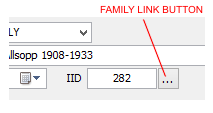
The Family Link is used to display family file records from a supported family history software package linked to a Genota Notebook. Each Notebook can be linked to a different family file and thus managed independently.
To link a family file two (2) constraints must be met;
The family history software must be supported by Genota.
The path to the family history software data file (family file) is established in the NOTEBOOK PREFERENCES.
Linking Family Files
Family files are linked at Notebook level through the Notebook Preferences screen located with the Notebook Manager. This method has been adopted to allow users to link to different Family Files (maybe from different sources) to each Notebook.
Select the Notebook that you want to link your Legacy Family file
Click select Preferences to open the Notebook Preferences. Notebook Preferences are Notebook specific
At the section headed Family File click the drop down button and select the appropriate software file format to be linked
Move to the next line labeled Family File Location and click select the Browse button to the right of the field
Navigate to the location of Family File to be linked
Select the Family File, then click select the Open button to return the file name and path to the Notebook Preferences screen
Click select the Close button at the bottom of the Notebook Preferences screen to return control to the Notebook Manager
Click select Open to access the selected Notebook
When the Notebook view is next displayed the Family File button will appear at the bottom of the sidebar. Click select to view the Family File
Identifying Family Files
Family files for most software packages can be identified by their file extensions. For the software support by Genota these are:
Supported Software
File Extension
Legacy Family Tree
<filename>.fdb
The Family Link
The Family Link contains two (2) views, the Master View and the Person Detail screen for displaying information releated tot he FAMILY FILE
At least one (1) Note must be created within a Notebook linked to Family File before the Family Link Master View can be displayed
Accessing the Family Link Screen from the Notebook
Once a family file has been linked to a Notebook, if an IID value exists the full details on a person as stored on the FAMILY FILE can be viewed by selecting the FAMILY LINK button
If the IID displays a value of zero (0) the FAMILY FILE VIEW will be displayed instead.
If an IID other then zero (0) exists but the persons details are not returned go to the FAMILY FILE VIEW screen and re-establish the link with the Note.
If known, the IID may be entered manually. For Legacy Family Tree users, the IID is synonymous to the RIN.
Legacy Family Tree is a registered trademark of Millennia Corp, USA