Notebook
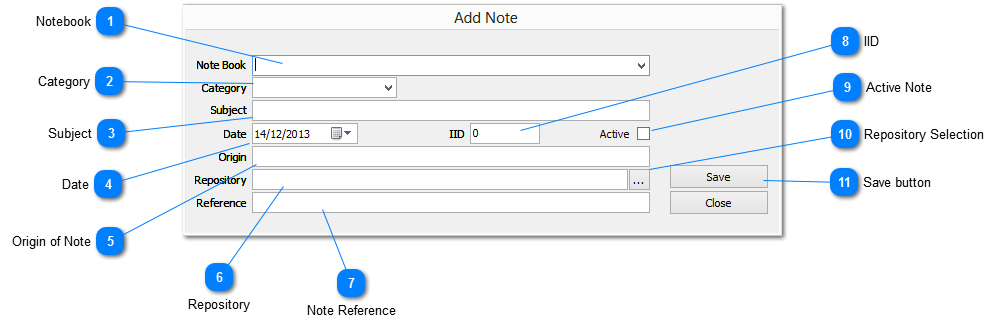
Select a NOTEBOOK from the drop down list into which to place the Note
|
|
 Category
The CATEGORY assigned to a Note. Select from the drop down list or add a value manually.
The drop down list is populated from the CATEGORY MASTER and any values manually added are written to the CATEGORY MASTER as well
|
|
 Subject
This field is normally used to record the subject matter or title by which the note is to be referred
THIS IS A MANDATORY FIELD and is used in many views and reports as the primary sort element
|
|
 Date
Used to record the Note creation date or the event date, depending on user requirements
It may be entered manually or by selecting the required date from the popup calendar by clicking on the button to the right
|
|
 Origin of Note
Used to record the name of a source, or the originator of the information
|
|
 Repository
The Repository where the source information for the Note is held
|
|
 Note Reference
A user defined Reference Number for the Note. This value can be auto-assigned if configured as such in the NOTEBOOK PREFERENCES or entered manually
This data element is primarily designed as a reference between Genota and an external filing system.
Entering the call number, or file reference of an external file as the Reference ID enables quick access between the two systems
|
|
 IID
Used to record the Individual ID, i.e. The unique identifier assigned to an individual in most family history software packages
Numeric values up to a maximum 2,400,000,000 are acceptable
|
|
 Active Note
Check this box to tag the Note as active, i.e. subject to current activity
|
|
 Repository Selection
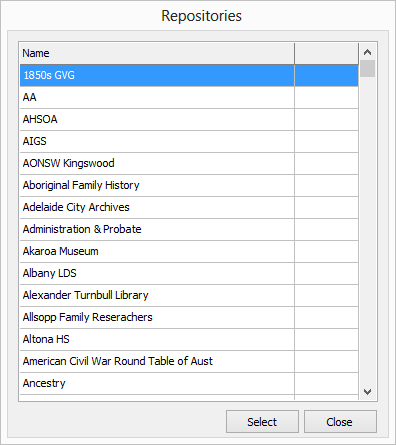
Displays the list of Repositories on file from which to select
|
|
 Save button
Save the Note information to file
|
|