To properly display this page you need a browser with JavaScript support.
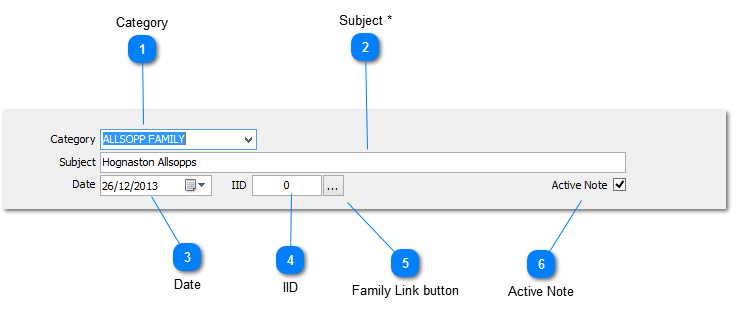
The NOTE HEADER contains the basic information required by each note
The labels for the data elements marked * below are controlled by the settings in the
NOTEBOOK PREFERENCES
Category
The category assigned to a note. Select from the drop down list or add a value manually.
The drop down list is populated from the
CATEGORY MASTER and any values manually added are written to the CATEGORY MASTER as well
Subject *
This field is normally used to record the subject matter or title by which the note is to be referred
THIS IS A MANDATORY FIELD
Date
Used to record the note creation date or the event date, depending on user requirements
It may be entered manually or by selecting the required date from the popup calendar by clicking on the button to the right
IID
Used to record the Individual ID, i.e. The unique identifier assigned to an individual in most family history software packages
This must be a numeric value
Family Link button
If a
Family File is linked to the Notebook, the FAMILY LINK button will appear to the right of the IID. Click selecting this button causes the
PERSON VIEW to open displaying the known details on the linked individual, if a valid IID has been entered.
The FAMILY LINK button will only appear once the note has been saved
Active Note
Check this box to tag the note as active, i.e. It is subject to current activity